Building an Agent-Native Read Later App in 2 Hours
I keep coming back to the concept of "agent-native" architecture. The idea is simple: instead of building features, you give an AI agent primitive tools (read file, write file, search) and let it figure out how to accomplish what the user wants.
Makes sense on paper. But every time I tried to imagine actually building something like this, I hit the same wall.
The Problem I Couldn't Solve
Here's what agent-native architecture looks like on paper:
- User's data lives in a file system
- An LLM has access to file operations
- User asks for something, agent loops until it's done
Simple. Elegant. And completely unclear how to ship it.
Because I'm thinking from a developer's perspective. If I'm building a web app or an iOS app, where does this "file system" live? On the user's device? That means running the LLM locally, exposing API keys, and dealing with all the chaos of uncontrolled environments.
Do I run everything server-side? Then I need to orchestrate containers per user, manage file persistence, handle auth, figure out how to proxy agent calls without exposing my Anthropic key. Suddenly I'm building Kubernetes just to make a read-later app.
I was stuck. Agent-native was a great concept I had no idea how to implement.
The Article That Unblocked Everything
Then I read Code And Let Live from fly.io.
Kurt Mackey's argument: AI agents need durable computers, not ephemeral sandboxes. The industry has been giving agents temporary environments that vanish after each task, forcing them to rebuild context every time. It's like wiping someone's memory between conversations.
His solution: sprites.dev. Persistent Linux containers that:
- Spin up in 1-2 seconds
- Persist state across sessions
- Automatically pause when idle
- Include 100GB of storage
- Come with built-in HTTPS URLs
This isn't just infrastructure. This is the backend for agent-native apps.
Each user gets a sprite. Their file system persists. My API talks to Sprites with my token, the agent runs in their sandbox, and I never expose API keys to the client. The architecture problem I couldn't solve? Sprites solved it.
The Weekend Hack
I had exactly 2 hours.
It was a Sunday morning at a "Vibe Coding" session at the office. Dan Shipper was there. Willie, head of platform at Every, too. We were all building something with AI.
My idea: a read-later app where I save articles and can chat with an AI about them. Ask for summaries. Find connections between topics. Generate notes.
The constraint: 2 hours, then I'm leaving for lunch.
I opened Claude Code and started building.
The Architecture
The app has three layers:
1. Per-user Sprites
When a user signs up, they get their own persistent Linux container. Inside it:
/library/
├── articles/     # Saved articles as markdown
├── notes/        # Agent-generated or user notes
└── context.md    # Library statistics and state
2. A thin API layer
My Hono server handles auth and proxies everything to Sprites:
// When user saves an article
const sprite = await getUserSprite(userId);
await sprite.saveArticle(markdown, filename);

// The sprite is their persistent file system
// I never manage containers - Sprites handles that
3. An agent with file primitives
The agent gets five tools:
read_file- Read any file in /librarywrite_file- Create or update fileslist_files- List directory contentssearch- Grep across all filesdelete_file- Remove files
That's it. No summarize_article tool. No generate_reading_profile tool. Just primitives.
What matters is what the agent can compose from these.
The Emergent Behavior That Blew My Mind
After building the basic app, I saved a few articles I'd been meaning to read. Then I opened the chat and typed:
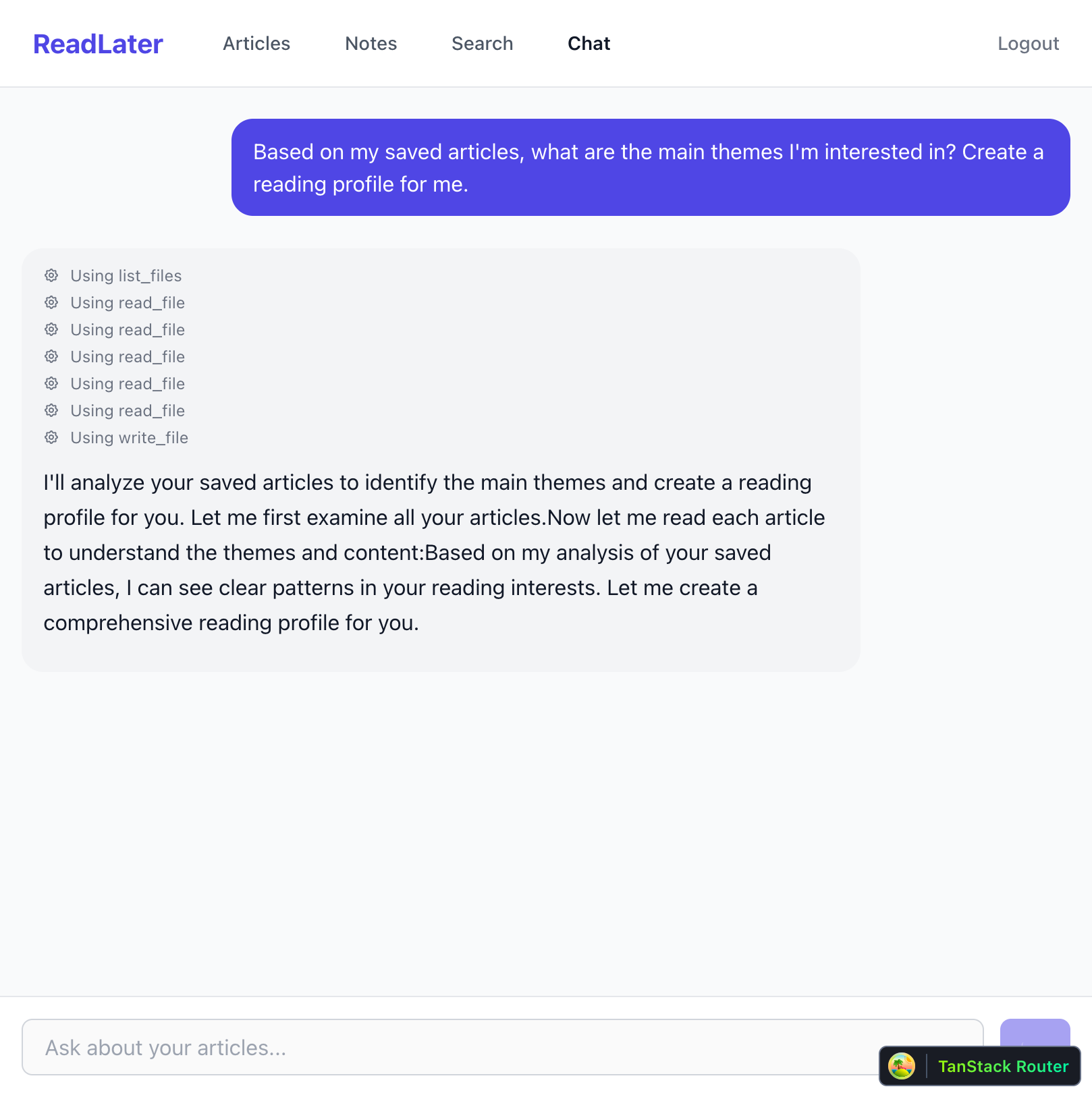
"Based on my saved articles, what are the main themes I'm interested in? Create a reading profile for me."
I watched the agent work:
Using list_files
Using read_file
Using read_file
Using read_file
Using read_file
Using read_file
Using write_file
It listed my articles. Read each one. Analyzed the themes. And then—without me asking—it wrote a reading-profile-analysis.md file to my notes.
The result was a comprehensive breakdown of my reading patterns:
- Building in Public & Sharing Work - I'm drawn to transparency and public creation
- AI-Powered Development - Interest in how AI is changing software development
- Mindful Living & Intentional Solitude - Despite tech focus, I value disconnection
- Infrastructure Philosophy - Drawn to contrarian takes that challenge orthodoxies
It even named my "reader archetype": The Thoughtful Builder.
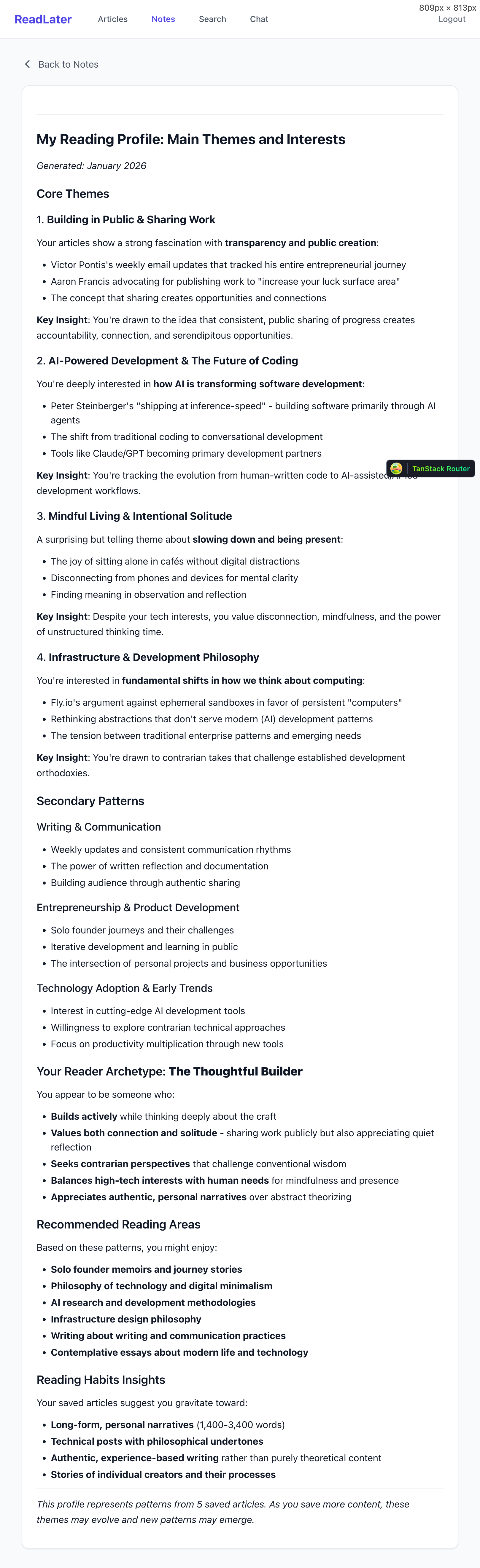
I didn't build a "generate reading profile" feature. I gave the agent files and file operations. It figured out the rest.
Features emerge from primitive tools combined with good judgment.
How It Actually Works
Let me walk through the key pieces.
User Sprites
When a user authenticates, I check if they have a sprite. If not, I create one:
static async getOrCreateForUser(user: User): Promise<UserSprite> {
  if (user.spriteName) {
    return new UserSprite(user.spriteName);
  }

  // Create new sprite for this user
  const spriteName = `readlater-${user.id.toLowerCase()}`;
  await spritesClient.createSprite(spriteName);

  // Initialize their file system
  const userSprite = new UserSprite(spriteName);
  await userSprite.exec("mkdir -p /library/articles /library/notes");
  await userSprite.writeFile("/library/context.md", INITIAL_CONTEXT);

  return userSprite;
}
The sprite persists. If a user comes back tomorrow, their files are still there.
The Agent System Prompt
I inject context about what the agent can see and do:
function createSystemPrompt(context: string): string {
  return `You are a helpful reading assistant for a read-later app.

## Current Library State
${context}

## Your Environment
The user's library is at /library with:
- /library/articles/ - Saved articles as markdown
- /library/notes/ - Notes created by user or agent
- /library/context.md - Library statistics

## Your Capabilities
- read_file: Read file contents
- write_file: Create or update files
- list_files: List files in a directory
- search: Search across all files
- delete_file: Delete a file
`;
}
The agent knows what exists without having to discover it.
The Agent Loop
When a user sends a message, the agent runs in a loop until it's done:
while (continueLoop && iteration < maxIterations) {
  const response = await anthropic.messages.create({
    model: "claude-sonnet-4-20250514",
    tools: TOOLS,
    messages,
  });

  // If the agent used tools, execute them
  for (const toolUse of toolUses) {
    const result = await executeTool(sprite, toolUse.name, toolUse.input);
    // Feed result back to agent
  }

  // If no tools used, agent is done
  if (toolUses.length === 0) {
    continueLoop = false;
  }
}
Tool Execution on Sprites
Each tool call runs a command in the user's sprite:
async function executeTool(sprite: UserSprite, toolName: string, input: any) {
  switch (toolName) {
    case "read_file":
      return await sprite.readFile(input.path);

    case "write_file":
      await sprite.writeFile(input.path, input.content);
      return `File written to ${input.path}`;

    case "list_files":
      return await sprite.exec(`ls -1 '${input.directory}'`);

    case "search":
      return await sprite.exec(`grep -r -i '${input.query}' /library`);
  }
}
The sprite talks to Sprites.dev via WebSocket. I never expose the Sprites token to clients.
Why Files?
Claude (and other LLMs) are good at working with files. They understand directory structures. They can parse markdown. They know how to organize information.
When I save an article, it becomes a markdown file with YAML frontmatter:
---
url: https://fly.io/blog/code-and-let-live/
title: Code And Let Live
source: fly.io
saved_at: 2026-01-11T10:30:00Z
word_count: 2400
reading_time: 10
---

# Code And Let Live

Kurt Mackey argues that AI agents need durable computers...
The agent can read this, understand it, and create new files that reference it. Everything is transparent. If you wanted, you could SSH into your sprite and see exactly what the agent has done.
The API Key Problem: Solved
Here's how the security model works:
- User authenticates with my API (email/password → session token)
- My API has the Sprites token and Anthropic key
- User sends chat message to my API
- My API runs the agent, executing tool calls on the user's sprite
- Results stream back to the user
The user never sees the Sprites token. They never see the Anthropic key. They just see their files and the agent's responses.
This was the piece I couldn't figure out before. Sprites makes it trivial.
What I'd Tell Someone Building This
If you've been interested in agent-native architecture but didn't know where to start:
1. Sprites.dev is the missing infrastructure. It handles the hard parts—container orchestration, persistence, networking—so you can focus on the agent.
2. Start with file primitives. read_file, write_file, list_files, search. You'll be surprised what the agent can compose from these.
3. Inject context, don't make the agent discover it. Tell the agent what exists in the system prompt. Discovery wastes tokens and time.
4. Let features emerge. I didn't plan the reading profile feature. The agent invented it. Your users will ask for things you never imagined.
5. Files are transparent. Unlike databases, files are debuggable. You can see exactly what the agent did. This matters when things go wrong.
What's Next
I built this in 2 hours. It's rough. There are bugs. The UI needs work.
But I can save articles. I can chat with them. The agent can create notes I never asked for but actually want.
For the first time, I have a read-later app that understands my reading patterns better than I do.
Not building features. Building environments where features can emerge.